Theranto EA based on “corrections,” which is particularly effective when trading popular currency pairs with corrections: AUD and CAD. The system utilizes key Forex market patterns—price reversals after sharp movements in any direction—and also utilizes RSI, ATR, and candlestick patterns to determine optimal levels for trading during corrections.
Attention!!! Please read carefully the rules for installing the advisor, and install it correctly. Before publishing, we check everything and publish only those advisors that work on our accounts !!! At least at the time of this article’s publication. Also, please note that the name of the adviser has been changed, you can find the original name of the adviser in our telegram channel https://t.me/FX_VIP/2575
| Developer price | |
| Terminal | MT4 |
| Currency pair | AUDCAD |
| Timeframe | M15 |
| Money management | At least 500 currency units |
| Recommended brokers | InstaForex , ICMarkets |
| For advisor recommended to use VPS 24/5 | vps24hour – Excellent inexpensive VPS for $3 per month you can use up to 3 terminals!!! |
Backtesting:
Backtesting was not conducted, as there is a live signal on the account from the author, detailed statistics below
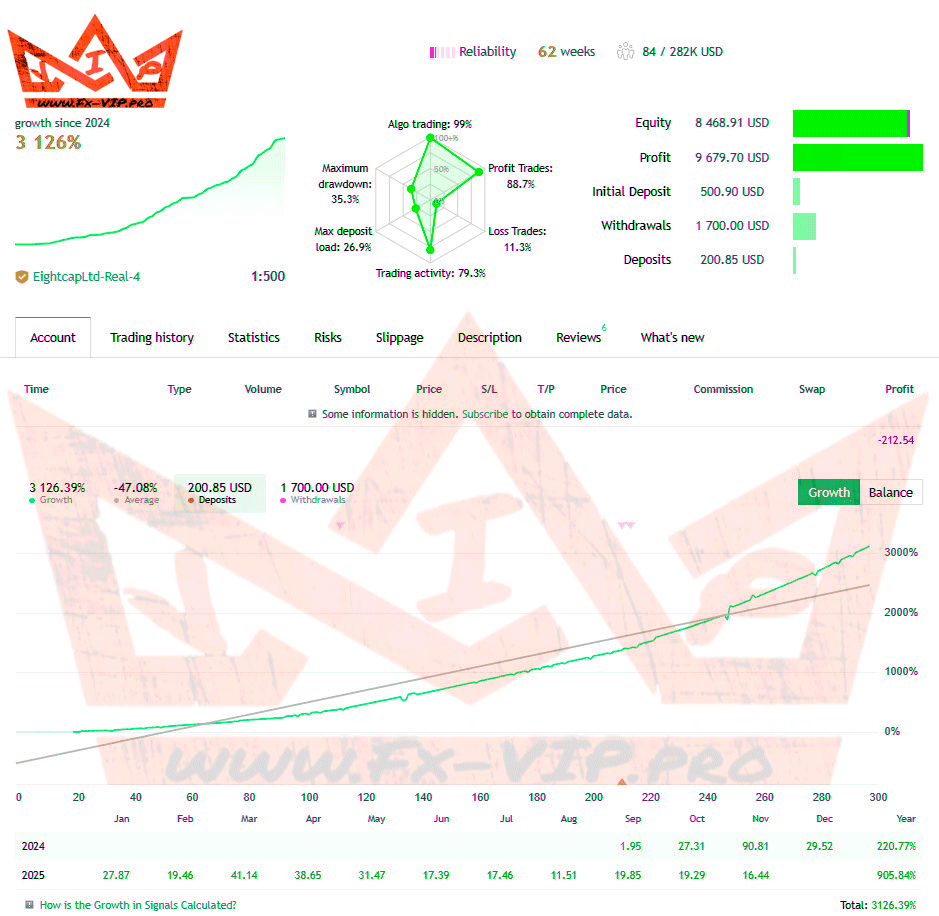
Link to monitoring – https://bit.ly/4iRidwB
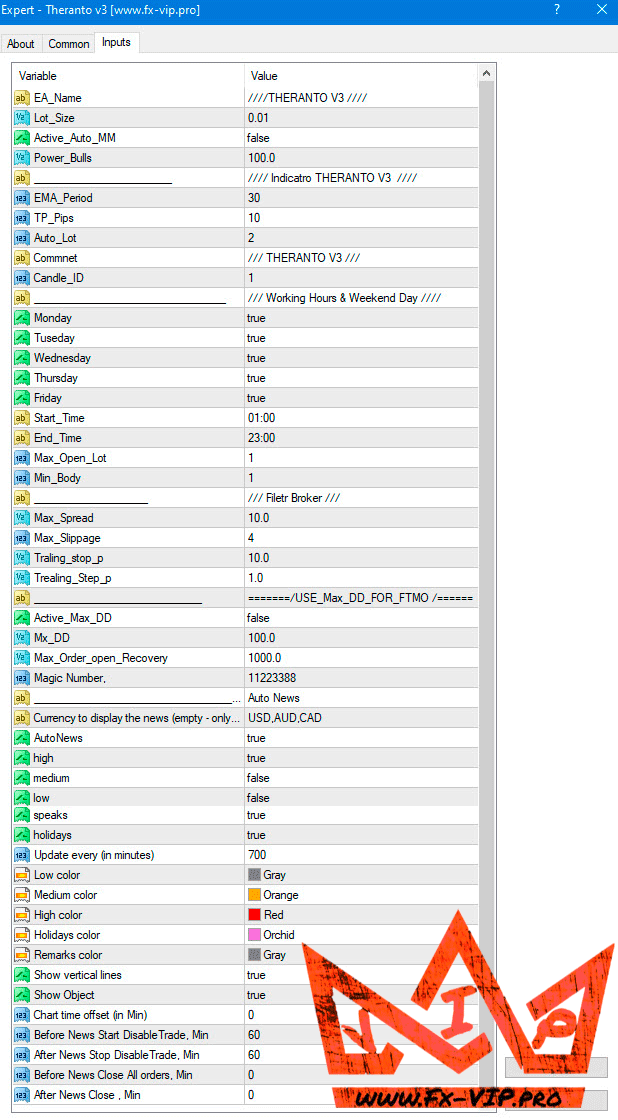
Settings:
Conclusion:
The EA shows very good results on a real account. While the risks are high, the profits are also very good. The EA archive, which you can download for free from the links below, also contains several sets of files with less risky settings from the developer. Judging by the name of one of the sets of files, it’s even suitable for FTMO, which means low-risk trading. However, everything needs to be verified. I recommend first testing the EA on a demo account to understand how it works. I also want to note that trading is directly dependent on important economic news, so it’s best to test the EA in live trading, as backtesting can yield inaccurate results.
Also, don’t forget to add a link to the web request for the news filter: Open Tool – Options – Copy and Paste Link on Web URL – http://nfs.faireconomy.media/ff_calendar_thisweek.xml
Unfortunately, trading on demo accounts may also differ slightly from trading on a real account due to slippage and other factors inherent to real accounts, but it will still be more accurate than backtesting. But if you want to test the EA more closely against a real trading account and minimize risk, I would recommend using cent accounts. For example, this broker has very good cent accounts: https://www.instaforex.org/?x=EYJYR After opening a cent account, you can deposit just $50, which is equivalent to 5,000 units for this EA is quite sufficient for trading just adjust the lot size in the EA settings to “0.1” and you can start trading.
Also, after registering using my link, you become my partner. Contact us on Telegram @FxVIPpro , and we’ll add you to a private channel for partners. There, you’ll receive useful bonuses and materials for profitable trading. All my partners also enjoy VIP service status; we have a dedicated manager who can quickly resolve any issues related to broker service.
Functionality tested, in build 1441 working.
Reminder: As with every trading system, always remember that forex trading can be risky. Don’t trade with money that you can not afford to lose. It is always best to test EA’s first on demo accounts, or live accounts running low lotsize. You can always increase risk later!
Recommend, in order not to miss important news and updates on the site, subscribe to our telegram channel https://t.me/Fx_VIP
DOWNLOAD EA Theranto