
SMC Rocket EA uses the Smart Money Concepts (SMC) trading methodology, which focuses on analyzing market structure and identifying areas of interest known as Order Blocks.
| Terminal | MT4 |
| Recommended brokers | InstaForex , IC Markets |
| For advisor recommended to use VPS 24/5 | vps24hour – Excellent inexpensive VPS for $3 per month you can use up to 3 terminals!!! |
The basic idea of the strategy is as follows:
- Market Structure Identification: The Expert Advisor primarily looks for swings (significant highs and lows).
- Break of Structure (BOS) Detection: When the price closes above the previous significant high or below the previous significant low, the Expert Advisor registers this as a “structure break.” This is the first signal of a possible continuation of the move in the direction of the breakout.
- Order Block (OB) Identification: After a structure break, the Expert Advisor looks for an “order block”—the last candle (or group of candles) in the opposite direction before the impulse move that led to the breakout. These zones are considered to be where major players have placed their positions. The EA forms a price zone based on this order block.
- Entry Point: The EA has two main entry logics, which can be used separately or together:
- Struct Entry (Entry on Structure Break): Opens a position immediately upon a structure break. This is a more aggressive entry type.
- Zone Entry (Entry from Zone): Opens a position when the price, after a structure break, returns to the previously defined order block and then breaks through it again in the direction of the initial impulse. This is a more conservative entry, awaiting confirmation.
All this logic is concentrated in the indicator part of the code, which analyzes the bars and generates a set of signals based on which the trading part of the advisor makes a decision about opening positions.
Settings:
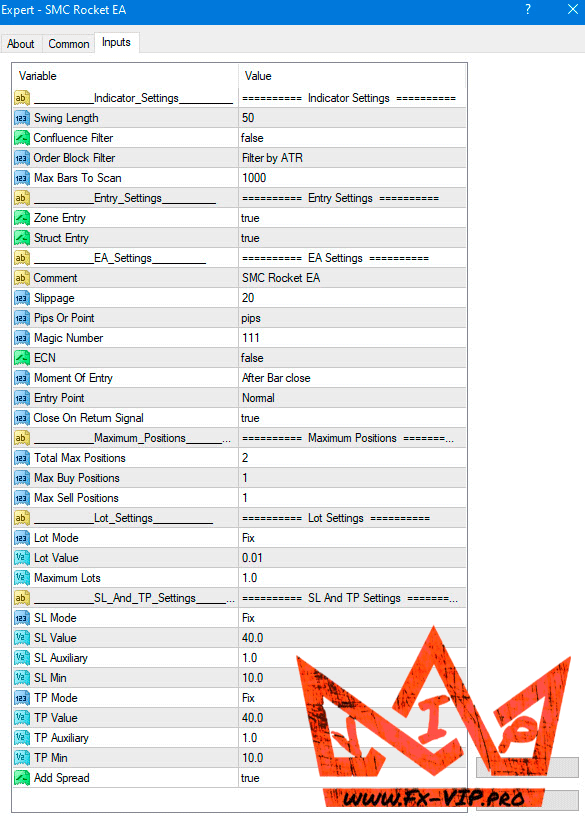
Description parameters:
Indicator Settings:
- Swing Length – Determines how significant a high or low must be to be considered a “swing.” For example, a value of 50 means that to determine a peak (swing high), 50 candles to the left and 50 candles to the right of it must be lower. The higher the value, the more global the structure the EA analyzes.
- Confluence Filter – If true, the breakout candle must have a certain shape to confirm a structure breakout (for example, for a bullish breakout, the candle’s body must be closer to the high than the low). This is an additional signal quality filter.
- Order Block Filter – Determines how to filter candles when searching for an order block. Atr — the candle must be no larger than a certain size, calculated using the ATR. Cumulative Mean Range — uses the average candle size over the period.
- Max bars to scan – Limits the number of historical bars the EA will analyze at startup.
Entry Settings:
- Zone Entry – If true, allows the EA to enter trades upon a “Block Order” breakout (conservative entry).
- Struct Entry – If true, allows the EA to enter trades immediately after a “Structure Break” (aggressive entry).
EA Settings:
- Comment – The advisor name that will be displayed in order comments.
- Slippage – The maximum allowable slippage in points when opening/closing orders.
- Pips Or points – Determines how the SL, TP, and grid step values are defined. pips — for 5-digit quotes, 1 pip = 10 points. points — 1 pip = 1 point.
- Magic Number – A unique identifier by which the advisor distinguishes its orders from those of others.
- ECN – If true, the mode for ECN brokers is activated (the order is first opened without SL/TP, and then immediately modified).
- Moment Of Entry – Determines the entry point: after the closing of the number of signal candles.
- Entry Point – “Normal” buy on a buy signal. “Reversal” sell on a buy signal, and vice versa.
- Close On Return Signal – Close on a contrary signal. If true, all current positions (e.g. buys) will be closed when a signal in the opposite direction (sell) appears.
Maximum Positions:
- Total Max Positions – The maximum total number of positions that can be open simultaneously.
- Max Buy Positions – The maximum number of buy positions.
- Max Sell Positions – The maximum number of sell positions.
Lot Settings:
- Lot Mode – Determines how the trade volume will be calculated (Fix – fixed lot, Percent Equity – % of equity, etc.).
- Lot Value – Specific value for the selected Lot Mode. For example, if Lot Mode = Fix, this will be the lot size (0.01, 0.1, etc.). If Lot Mode = Percent Equity, this will be the risk percentage (e.g., 1.0 for 1%).
- Maximum Lots – Limits the maximum lot size for a single trade, regardless of calculations.
SL And TP Settings:
- SL Mode / TP Mode – Determines how Stop Loss and Take Profit are calculated (Fix – in pips, Based on ATR – based on ATR, High/Low Candles – based on the high/low of candles, Risk/Reward – relative to SL).
- SL Value / TP Value – The primary value for calculation (e.g., the number of pips or the ATR period).
- SL Auxiliary / TP Auxiliary – Used in some modes (e.g., as a multiplier for ATR).
- SL Min / TP Min – The minimum acceptable SL/TP size in pips.
- Add Spread – If true, the EA will add the spread size to Stop Loss and Take Profit to make calculations more accurate.
A detailed analysis of SL/TP Modes:
| Mode (SL Mode) | Description | Parameters used and their meaning |
| OFF | Stop Loss is disabled. The advisor will not set a Stop Loss for opened positions. | – |
| Money | Loss in the deposit currency. The SL is calculated so that when it is triggered, the loss is a fixed amount in your account currency. | SL Value: Loss amount (e.g. 10.0 would mean a loss of $10, €10, etc.). SL Min: Minimum acceptable SL in pips. |
| Percent Equity | Loss as a percentage of equity. SL is calculated so that when it is triggered, the loss will be a specified percentage of the current funds (equity) in the account. | SL Value: Percentage of equity to risk (e.g. 1.0 = 1% of account). SL Min: Minimum acceptable SL in pips. |
| FIX | Fixed SL in pips. The simplest mode, it sets the SL at a fixed distance from the opening price. | SL Value: Distance in pips or points. SL Min: Minimum acceptable SL in pips. |
| Absolute Price Level | Absolute price level. SL is set at a specific, predetermined price level. | SL Value: The price level for SL for BUY trades (e.g., 1.07500). SL Auxiliary: The price level for SL for SELL trades (e.g., 1.08500). |
| Based on ATR | Based on the ATR indicator, the SL is set at a distance equal to the ATR indicator value multiplied by the coefficient. This makes the SL dynamic, depending on current volatility. | SL Value: ATR indicator period (e.g. 14). SL Auxiliary: ATR value multiplier (e.g. 1.5 will set SL at a distance of 1.5 * ATR). SL Min: Minimum acceptable SL in pips. |
| High/Low Candles | Based on candlestick extremes (High/Low). SL is set beyond the minimum/maximum of a specified number of previous candlesticks. | SL Value: The number of candles to search for the minimum (for BUY) or maximum (for SELL). SL Auxiliary: An additional offset in pips from the found extreme. |
| Percent Price | As a percentage of the opening price. The SL distance is calculated as a percentage of the position entry price. | SL Value: Percentage of the opening price (e.g., 0.1% of 1.20000 will give an SL of 12 pips). SL Min: Minimum acceptable SL in pips. |
Similar to SL Mode, TP Mode determines how the Take Profit level will be calculated.
The only additional value in TP Mode is Risk/Reward: the ratio to Stop Loss. This is a very important mode. TP is calculated based on the existing Stop Loss. The distance to TP will be N times greater than the distance to SL.
TP Value: Risk/Reward Ratio. For example, if SL = 20 pips and TP Value = 2, then TP will be set at 40 pips from the opening price.
Compatibility of Lot Settings and SL and TP Settings Modes:
This is the most important and complex section. Some modes are incompatible, and the code even includes a check that prevents the EA from running with such an incorrect configuration.
The main cause of incompatibility is a circular dependency.
- To calculate a risk-based lot in pips, the EA needs to know the stop-loss size in pips. Formula: Lot = (Risk Amount) / (SL Size in pips * Pip Value).
- To calculate a risk-based stop-loss in pips, the EA needs to know the lot size. Formula: SL Size in pips = (Risk Amount) / (Lot * Pip Value).
As you can see, one depends on the other. The EA cannot calculate both values simultaneously. Therefore, you cannot use the risk-based lot mode simultaneously with the risk-based stop-loss mode.
Let’s look at all the possible combinations.
Mode categories:
- Risk-based lot sizes: Money, Percent Equity, Percent Balance. Requires a stop loss with a known distance in pips.
- NON-risk-based lot sizes: Fix, Money Margin, Percent Margin (based on margin). Does not require a stop loss for calculation.
- Risk-based stop loss: Money, Percent Equity. Requires a lot for calculation.
- NON-risk-based stop loss: Fix, Absolute Price Level, Based on ATR, High/Low Candles, Percent Price. Does not require a lot for calculation.
Compatibility Table and Description of Combined Operation
| Lot Mode | Compatible SL Modes | Description of combined work |
| Fix (Fixed lot) | ANY except OFF | Universal mode. You set a fixed lot (e.g., 0.1). The stop-loss is calculated independently according to its own rule (fixed points, ATR, price level, etc.). Example: Lot 0.1, SL 50 points |
| Money (Risk in money) | Fix, Absolute Price Level, Based on ATR, High/Low Candles, Percent Price | You set the amount you’re willing to risk (e.g., $50). The advisor calculates the stop loss in points based on the selected rule (e.g., ATR) and selects a lot size such that, if the stop loss is triggered, the loss will be approximately $50. |
| Percent Equity (Risk in % of equity) | Fix, Absolute Price Level, Based on ATR, High/Low Candles, Percent Price | The most popular mode for capital management. You set the risk as a percentage of your account (e.g., 1%). The advisor looks at the distance to the SL (e.g., 70 pips for SL Fix) and calculates the lot size that would result in a loss of exactly 1% of your account. |
| Percent Balance (Risk as a % of balance) | Fix, Absolute Price Level, Based on ATR, High/Low Candles, Percent Price | The same as the previous mode, but the risk calculation is based on the balance, not on equity (funds taking into account floating profit/loss). |
| Money Margin (Money on margin) | ANY except OFF | The lot is calculated based on how many lots can be purchased with the specified margin amount. For example, if 1 lot requires $1,000 in margin and you specify a Lot of $200, the lot will be 0.2. This mode does not involve stop-loss risk. |
| Percent Margin (% of equity margin) | ANY except OFF | The lot is calculated based on the percentage of funds you’re willing to allocate as margin. For example, with an account size of $10,000 and a Lot Value = 10(%), $1,000 will be allocated as margin. The lot will be calculated accordingly. This mode also doesn’t involve stop-loss risk. |
Incompatible combinations:
- lotMoney + slMoney -> Conflict!
- lotAccountPercent + slAccountPercent -> Conflict!
- Any risk-based lot + slMoney or slAccountPercent -> Conflict!
I hope this detailed analysis will help you deeply understand the logic behind the SMC Rocket EA and configure it effectively.
A separate thread has been created for this advisor on the forum https://fxclub.top/index.php?threads/1-smc-rocket-ea.522/ (Note: registration is required to view the thread and chat on the forum)
This is a space for communication, discussion of the nuances of this EA, exchange of experience and results, as well as a joint search for optimal settings.
Reminder: As with every trading system, always remember that forex trading can be risky. Don’t trade with money that you can not afford to lose. It is always best to test EA’s first on demo accounts, or live accounts running low lotsize. You can always increase risk later!
