
FluxTrinity EA This is a counter-trend or trend-following system, depending on the selected mode, based on the analysis of the last three candlesticks. The basic logic compares opening and closing prices and looks for specific patterns in the highs and lows of the candlesticks. Trade confirmation uses several filters, a trend filter and a volatility filter with special conditions.
| Developer price | FREE |
| Terminal | MT4 |
| Currency pair | ANY |
| Timeframe | ANY |
| Recommended brokers | InstaForex , ICMarkets |
| For advisor recommended to use VPS 24/5 | vps24hour – Excellent inexpensive VPS for $3 per month you can use up to 3 terminals!!! |
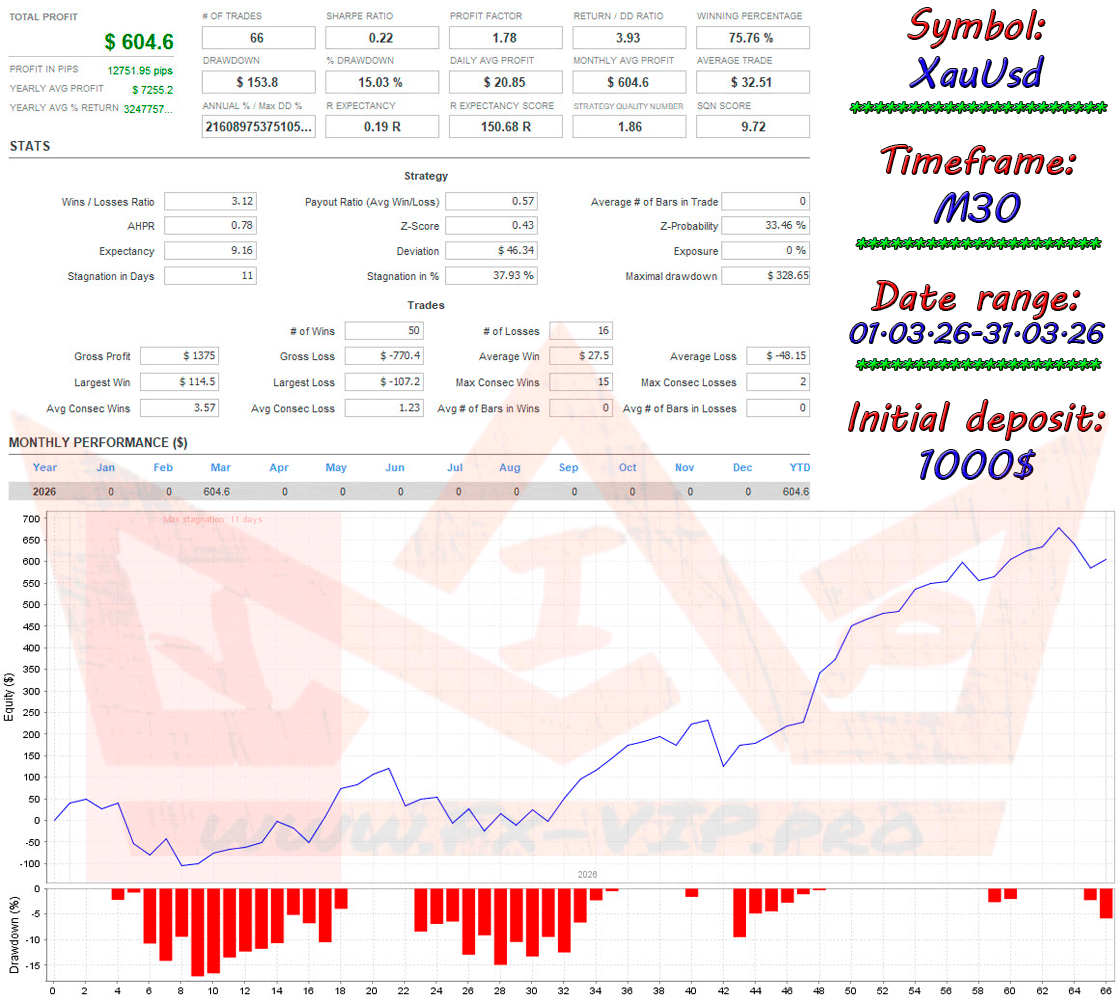
Backtesting:
Testing was conducted on the XauUsd pair on timefraim M30 with settings, the file for which you can download from the link in our Telegram channel https://t.me/srcfx/61 . However, keep in mind that you can choose the best settings and currency pairs yourself.This settings file is not some ideal recommended solution, it is just a starting point.
Settings:
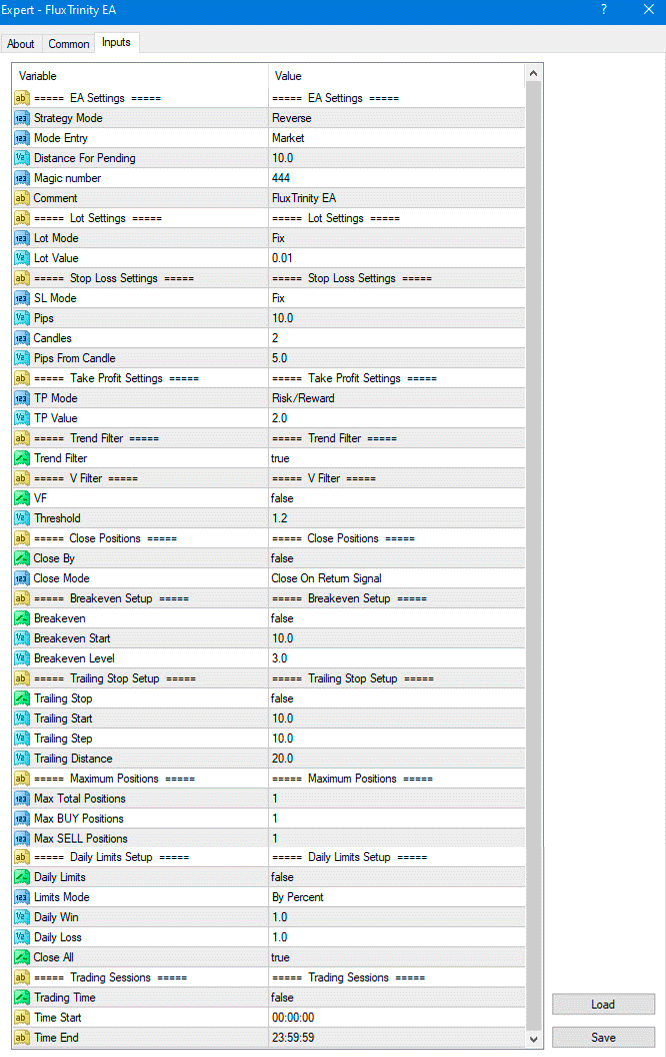
Description parameters:
===== EA Settings =====
| Parameter | Description and influence |
|---|---|
| Strategy Mode | Defines the basic entry logic. Normal : looks for reversal signals (3 falling candles for a buy, 3 rising candles for a sell). Reverse : looks for signals of weakening momentum (3 rising candles with falling highs for a buy, 3 falling candles with rising lows for a sell). |
| Mode Entry | Position entry method. Market : open a trade at the current market price immediately after receiving a signal. Pending Stop : place a pending stop order (Buy Stop or Sell Stop) at a distance Distance For Pendingfrom the current price. Pending Limit : place a pending limit order (Buy Limit or Sell Limit) at a distance Distance For Pendingfrom the current price. |
| Distance For Pending | The distance in points from the current price at which pending orders will be placed if the PendingStopor mode is selected PendingLimit. |
| Magic number | A unique identifier assigned by the advisor to its orders. This allows it to distinguish its own trades from those opened manually or by other robots. |
| Comment | A text comment that will be added to each order opened by the advisor. |
===== Lot Settings =====
| Parameter | Description and influence |
|---|---|
| Lot Mode | Lot size calculation method. Fix : A fixed lot specified in the parameter is used Lot Value. % Equity : The lot is calculated as a percentage of the available funds ( Equity) in the account. The calculation is performed so that when Stop Loss is triggered, the loss is the specified percentage ( Lot Value). |
| Lot Value | The value for calculating the lot. If Lot Mode= Fix , this will be a specific lot size (e.g., 0.1). If Lot Mode= % Equity , this will be the percentage risk per trade (e.g., 1.0 means risking 1% of equity). |
===== Stop Loss Settings =====
| Parameter | Description and influence |
|---|---|
| SL Mode | Stop Loss setting mode. Off : Stop Loss is not set. Fix : A fixed Stop Loss is set at the distance specified in Pips. Candles : Stop Loss is set based on the extremes (High/Low) of previous candles. |
| Pips | Fixed Stop Loss size in points. Used if SL Mode= Fix . |
| Candles | The number of candles back to find the minimum (for buys) or maximum (for sells) for setting a Stop Loss. Used if SL Mode= Candles . |
| Pips From Candle | An additional offset in points from the detected candlestick high/low for setting a Stop Loss. Creates a “buffer zone.” |
===== Take Profit Settings =====
| Parameter | Description and influence |
|---|---|
| TP Mode | Take Profit setting mode: Off : Take Profit is not set. Fix : A fixed Take Profit is set, equal to the value TP Valuein points. Risk/Reward : Take Profit is calculated based on the Stop Loss size multiplied by the coefficient from TP Value. |
| TP Value | Take Profit value. If TP Mode= Fix , this is the number of pips. If TP Mode= Risk/Reward , this is the multiplier (for example, 2.0 means Take Profit will be twice the Stop Loss). |
===== Trend Filter =====
| Parameter | Description and influence |
|---|---|
| Trend Filter | Enables ( true ) or disables ( false ) additional trend. Allows to filter out trades against the main trend. |
===== V Filter =====
| Parameter | Description and influence |
|---|---|
| VF | Enables ( true ) or disables ( false ) the volatility filter. Prevents new trades from being opened if the current volatility is too high (exceeds Threshold). |
| Threshold | Threshold value for the VF filter. If the calculated VF index is higher than this value, trading is blocked. |
===== Close Positions =====
| Parameter | Description and influence |
|---|---|
| Close By | Enables ( true ) or disables ( false ) the function of automatic closing of positions on alternative signals. |
| Close Mode | Determines the closing condition. Close On Return Signal : The position will be closed when an opposite trading signal appears. Close On Trend Change : The position will be closed if the trend direction changes according to the trend filter. |
===== Breakeven Setup =====
| Parameter | Description and influence |
|---|---|
| Breakeven | Enables (true) or disables (false) the function of moving Stop Loss to breakeven. |
| Breakeven Start | The number of profit points, upon reaching which the Stop Loss will be moved to breakeven. |
| Breakeven Level | The number of points above the opening price where the Stop Loss will be placed after the Breakeven Start is triggered. |
===== Trailing Stop Setup =====
| Parameter | Description and influence |
|---|---|
| Trailing Stop | Enables (true) or disables (false) trailing stop, which “pulls” Stop Loss along with the price. |
| Trailing Start | The number of profit points after which the trailing stop is activated. |
| Trailing Step | The step through which the Stop Loss will move. |
| Trailing Distance | The distance in points from the current price at which Stop Loss will be maintained. |
===== Maximum Positions =====
| Parameter | Description and influence |
|---|---|
| Max Total Positions | Maximum allowed total number of open positions (Buy + Sell). |
| Max BUY Positions | Maximum allowed number of open buy positions. |
| Max SELL Positions | Maximum allowed number of open sell positions. |
===== Daily Limits Setup =====
| Parameter | Description and influence |
|---|---|
| Daily Limits | Enables (true) or disables (false) daily profit and loss limits. |
| Limits Mode | Limit calculation mode. By Money: limits are set in the deposit currency. By Percent: limits are set as a percentage of the balance at the beginning of the day. |
| Daily Win | The amount of daily profit (in money or percentage) that, upon reaching which, the advisor will stop trading until the next day. |
| Daily Loss | The amount of daily loss (in money or percentage) at which the advisor will stop trading until the next day. |
| Close All | If true, all open trades will be closed immediately upon reaching the Daily Win or Daily Loss. If false, no new trades will be opened, but existing trades will continue. |
===== Trading Sessions =====
| Parameter | Description and influence |
|---|---|
| Trading Time | Enables (true) or disables (false) time trading. |
| Time Start | Trading session start time |
| Time End | Trading session end time |
A separate thread has been created for this advisor on the forum https://fxclub.top/index.php?threads/4-fluxtrinity-ea.564/ (Note: registration is required to view the thread and chat on the forum)
This is a space for communication, discussion of the nuances of this EA, exchange of experience and results, as well as a joint search for optimal settings.
Reminder: As with every trading system, always remember that forex trading can be risky. Don’t trade with money that you can not afford to lose. It is always best to test EA’s first on demo accounts, or live accounts running low lotsize. You can always increase risk later!
