Game Change EA Based on a proprietary indicator, it automatically sells when a red dot appears and continues to sell until a yellow cross appears, signaling a potential end to the trend. The same logic applies to buy orders. When a blue dot appears, the EA initiates a buy order and closes the buy cycle as soon as it detects a yellow cross. This EA is suitable for any currency pair and any timeframe, but it works especially well on instruments with a strong trend.
Attention!!! Please read carefully the rules for installing the advisor, and install it correctly. Before publishing, we check everything and publish only those advisors that work on our accounts !!! At least at the time of this article’s publication. Also, please note that the name of the adviser has been changed, you can find the original name of the adviser in our telegram channel https://t.me/FX_VIP/2640
| Developer price | |
| Terminal | MT4 |
| Currency pair | ANY |
| Timeframe | M15 |
| Money management | At least 1000 currency units |
| Recommended brokers | InstaForex , ICMarkets |
| For advisor recommended to use VPS 24/5 | vps24hour – Excellent inexpensive VPS for $3 per month you can use up to 3 terminals!!! |
Backtesting:
Backtesting was not conducted, as there is a live signal on the account from the author, detailed statistics below
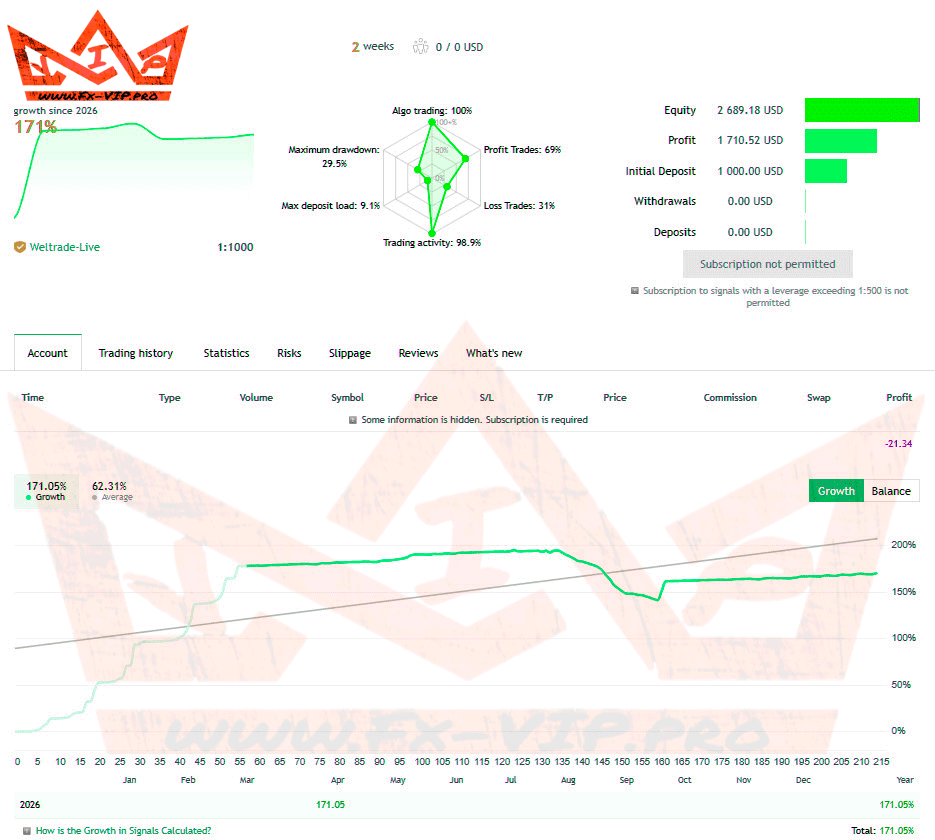
Link to monitoring – https://bit.ly/4dSrXXd
Settings:
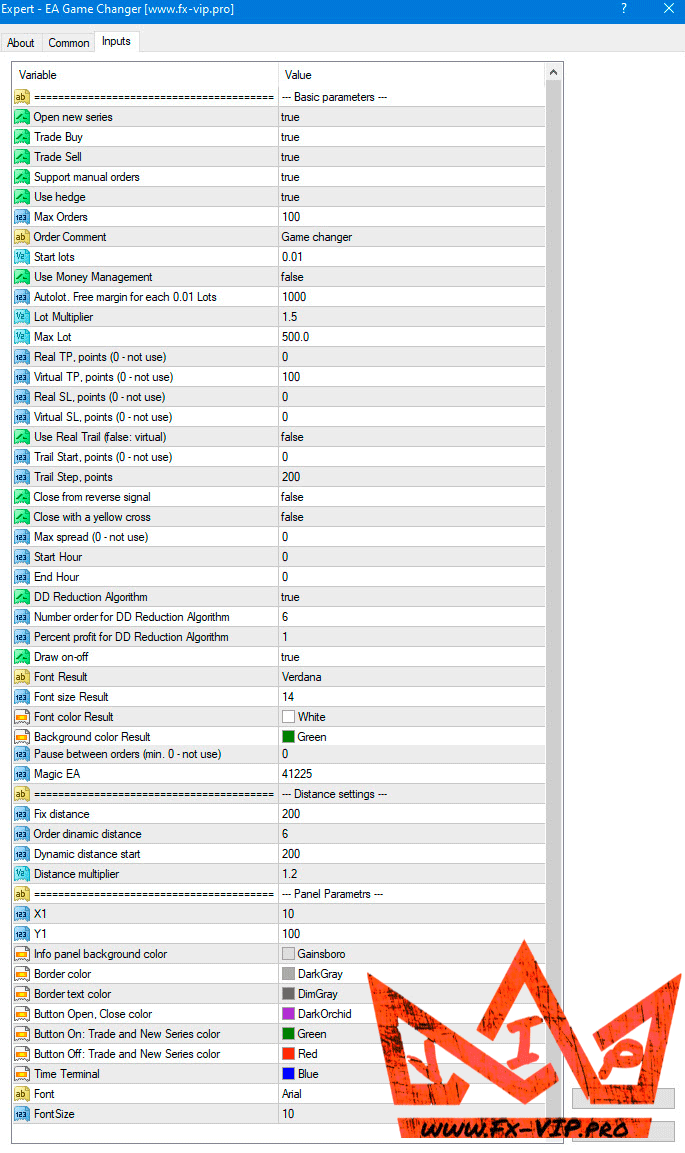
Description of settings
- Open new series – true/false – beginning of a new series of orders.
- Trade Buy – allow the EA to buy.
- Trade Sell – allow the EA to sell.
- Support manual orders – true/false – allow the EA to control manual orders
- Use hedge – allow the EA to trade both direction buy and sell. If false only one trade direction.
- Max Orders – the maximum amount of orders allowed.
- Order Comment – the description of the system name
- Start lots – the minimum starting lot
- Use Money Management – true/false – use of automatic lot calculation true or false.
- Autolot. Free margin for each 0.01 lot -the amount of free margin for opening every 0.01 lots.
- Lot multiplier – the lot multiplier for the following orders.
- Max lot – the maximum lot size allowed.
- Real TP points (0 – not use) – real TP, the broker can see it – in points
- Virtual TP points (0 – not use) – virtual TP, the broker cannot see it – in points
- Real SL points (0 – not use) – real SL, the broker can see it – in points
- Virtual SL points (0 – not use) – virtual SL, the broker cannot see it – in points
- Use Real Trail (false: virtual) true/false – the use of real trail if true broker can see, if false broker cannot see
- Trail Start points (0 – not use) – How many pips profit is required before the trailing stop begins. (0 = trailing off)
- Trail Step points – after trailing is active, the stop loss moves every X pips the price advances.
- Close from reverse signal – true/false – if true EA will close if signal/trend changes
- Max spread (0 – not use) – the maximum spread allowed
- Start Hour – the hour that the EA must start according to broker market watch
- End Hour – the hour that the EA must end according to broker market watch
- DD Reduction Algoritm – drawdown reduction algorithm it when last order with profit will be closed together with the first order.
- Number order for DD Reduction Algoritm – from which order the drawdown reduction algorithm is activated.
- Percent profit for DD Reduction Algoritm – percentage of profit when closing orders in the drawdown reduction mode.
- Draw on-off – true/false – Showing the profit labels on the chart or not
- Next is font settings
- Pause between orders (min 0 – not use) – amount of minutes to pause between orders
- Magic – is a special number that the EA assigns to its orders.
- Fix distance – fixed distance between orders in points
- Order dinamic distance – from which order will the dynamic distance be applied in order.
- Dinamic distance start – the starting value for the dynamic distance in points.
- Distance multiplier – the dynamic distance multiplier.
- Next: Panel Parameters
Recommendations:
EA can be used to trade in full auto or in a semi-manual way by using the indicator. If trading in
full auto, the EA will follow the indicator signals as the indicator is already build into the EA and you
do not need to use it or put it on the chart. Just remember it follows a grid/martingale strategy and
when the trend changes all of a sudden it may increase the lots according to the grid distance and
add more trades until the market retraces and it closes in profit.
Only if you want to use EA as a trading tool and control the EA to trade with trend only, then you
need to buy the indicator so that you can clearly see the trend.
FULL AUTO – Recommended capital:
XAUUSD: m15
Aggressive: Minimum 30 000 at starting lot 0.01 you can use a cents account also. $300 is 30 000 cents at 0.01lot or you can use a bigger deposit like $600 which is 60 000 cents at 0.02 starting lot
Moderate: 40 000 at starting lot 0.01
Conservative: 50 000 at starting lot 0.01
Other currency pairs like: EURUSD; GBPUSD; AUDCAD; NZDUSD m15 etc:
Aggressive: Minimum $3000 or 3000 cents for initial lot 0.01
Moderate: $4000 or 4000 cents for initial lot 0.01
Conservative: $5000 or 5000 cents for initial lot 0.01
I’d also like to draw your attention to a new unique offer from broker InstaForex:
- Ultra-tight Spread Account
- 30% Trading Bonus
- 0% Fee for Deposit/Withdrawal
- Two international licenses: Cyprus and the UK
- Card deposits accepted from almost all countries
- Fast deposits and withdrawals
- Continuous support in several languages
All this is only for our partners registered via this link: https://www.instawebinvest.com/fast_open_live_account?x=EYJYR
ALSO, AFTER REGISTRATION, WRITE TO US ON TELEGRAM @FxVIPpro WE WILL ADD YOU TO A PRIVATE CHANNEL WHERE OUR PARTNERS WILL HAVE NICE BONUSES AND GIFTS!
Functionality tested, in build 1470 working.
Reminder: As with every trading system, always remember that forex trading can be risky. Don’t trade with money that you can not afford to lose. It is always best to test EA’s first on demo accounts, or live accounts running low lotsize. You can always increase risk later!
Recommend, in order not to miss important news and updates on the site, subscribe to our telegram channel https://t.me/Fx_VIP
DOWNLOAD EA Game Change