

KeltiX EA uses a counter-trend strategy based on a combination of several technical indicators: two Keltner Channels and three moving averages. The main idea is to enter the market against the main local movement when the price reaches the extreme boundaries of the price channel, using moving averages as an additional filter to confirm the signal.
| Terminal | MT4 |
| Recommended brokers | InstaForex , IC Markets |
| For advisor recommended to use VPS 24/5 | vps24hour– Excellent inexpensive VPS for $3 per month you can use up to 3 terminals!!! |
Buy Entry Conditions
A buy trade is opened when the following conditions are met:
- MA1 Filter: The primary moving average is falling, indicating a general downtrend.
- MA2 Filter: The current bar’s opening price crosses below the MA2 moving average.
- MA3 Filter: The current bar’s opening price is below the MA3 moving average.
- Keltner Channel Signal: The price touches or breaks the lower boundary of the entry Keltner Channel. This is the primary signal that the price has reached oversold territory and an upward rebound is likely.
In simple terms, the EA looks for a moment when, amid a general decline, the price makes a sharp downward breakout, touching the lower boundary of the channel, and opens a trade in anticipation of a corrective rally.
The rules for entering a sell position are completely opposite to the rules for entering a buy position.
Position Exit Conditions:
The main exit from the trade is carried out based on the Keltner Channel signal (Exit KC):
- A buy position is closed if the price touches the upper boundary of the exit channel.
- A sell position is closed if the price touches the lower boundary of the exit channel.
It’s also possible to set parameters for early position closure based on other conditions that occur earlier than the main exit:
- Stop Loss: Activation of a preset stop loss.
- Take Profit: Reaching a preset take profit.
- Trailing Stop: Modifying a stop loss that follows the price at a specified distance.
- Breakeven: Moving the stop loss to breakeven upon reaching a certain profit.
- Reverse signal (optional): If closeAtOpposite is enabled, the position will be closed when an entry signal in the opposite direction occurs.
Settings:
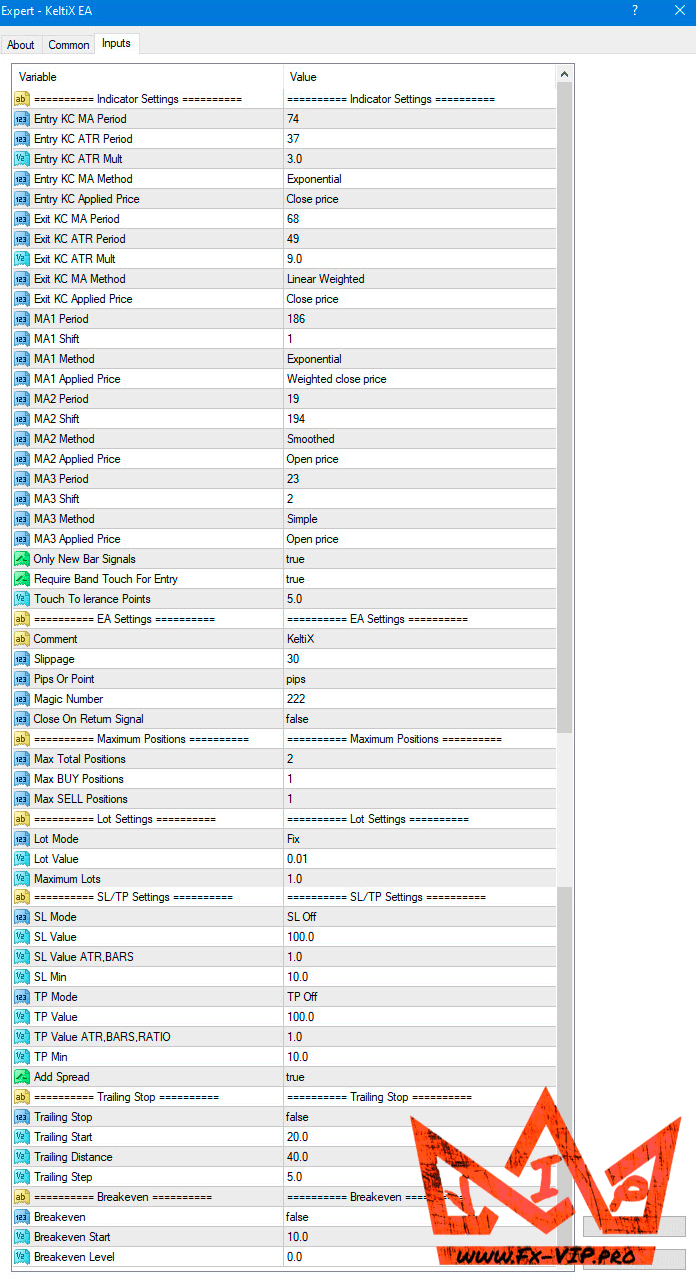
Description parameters:
=========== Indicator Settings ===========
- Entry KC MA Period: The moving average period for the entry Keltner Channel.
- Entry KC ATR Period: The ATR indicator period for the entry Keltner Channel.
- Entry KC ATR Mult: The multiplier (coefficient) for the ATR of the entry Keltner Channel, determining the channel width.
- Entry KC MA Method: The calculation method (SMA, EMA, SMMA, LWMA) for the entry Keltner Channel.
- Entry KC Applied Price: The price type (Close, Open, High, etc.) used to calculate the entry Keltner Channel.
- Exit KC MA Period: The moving average period for the exit Keltner Channel (used to close trades).
- Exit KC ATR Period: The ATR indicator period for the exit Keltner Channel.
- Exit KC ATR Mult: Multiplier (coefficient) for the ATR of the output Keltner Channel.
- Exit KC MA Method: Calculation method for the output Keltner Channel.
- Exit KC Applied Price: Price type used to calculate the output Keltner Channel.
- MA1 Period: Period for the first moving average (trend filter).
- MA1 Shift: Shift (in bars) for the first moving average.
- MA1 Method: Calculation method for MA1.
- MA1 Applied Price: Price type for MA1.
- MA2 Period: Period for the second moving average (crossover filter).
- MA2 Shift: Shift (in bars) for the second moving average.
- MA2 Method: Calculation method for MA2.
- MA2 Applied Price: Price type for MA2.
- MA3 Period: Period for the third moving average (price position filter).
- MA3 Shift: Shift (in bars) for the third moving average.
- MA3 Method: Calculation method for MA3.
- MA3 Applied Price: Price type for MA3.
- Only New Bar Signals: If true, signals are checked only once at the opening of a new bar.
- Require Band Touch For Entry: If true, a price touching the entry channel boundary is required to enter a trade.
- Touch Tolerance Points: Tolerance in points for registering a touch of the channel boundary.
=========== EA Settings ===========
- Comment: Comment to be assigned to orders.
- Slippage: Maximum allowable slippage in points when opening an order.
- Pips Or Point: Calculation mode: pips (for 4- and 2-digit quotes) or points (for 5- and 3-digit quotes).
- Magic Number: Unique number used by the EA to distinguish its orders from those of others.
- Close On Return Signal: If true, the EA will close the current position when a signal to open in the opposite direction appears.
========== Maximum Positions ===========
- Max Total Positions: Maximum total number of simultaneously open positions.
- Max BUY Positions: Maximum number of open Buy positions.
- Max SELL Positions: Maximum number of open Sell positions.
=========== Lot Settings ===========
- Lot Mode: Lot size calculation mode: Fix (fixed), Money (risk in deposit currency), Percent Equity (risk as a percentage of equity).
- Lot Value: Value for lot calculation. For Fix, this is the lot size. For risk modes, this is the amount in currency or a percentage.
- Maximum Lots: Maximum lot size for a single trade.
=========== SL/TP Settings ===========
- SL Mode: Stop Loss calculation mode – SL Off (disabled), SL Fix (in points/pips), SL ATR (based on ATR), SL Bars (based on High/Low for N bars).
- SL Value: Primary value for SL calculation (points, ATR period, number of bars).
- SL Value ATR,BARS: Additional value (multiplier for ATR, offset for SL Bars).
- SL Min: Minimum acceptable SL in points/pips.
- TP Mode: Take Profit calculation mode – TP Off (disabled), TP Fix (in points/pips), TP SL Ratio (ratio to SL), TP ATR, TP Bars.
- TP Value: Primary value for TP calculation.
- TP Value ATR,BARS,RATIO: Additional value (multiplier for TP ATR, TP SL Ratio, offset for TP Bars).
- TP Min: Minimum acceptable TP in points/pips.
- Add Spread: If true, the current spread will be added to/subtracted from SL and TP.
=========== Trailing Stop ===========
- Trailing Stop: Try (enables) or false (disabled) the trailing stop function.
- Trailing Start: The number of points/pips in profit after which the trailing stop is activated.
- Trailing Distance: The distance from the current price at which the stop loss will be set.
- Trailing Step: The increment at which the stop loss will follow the price.
=========== Breakeven ===========
- Breakeeven: Try (enables) or false (disabled) the move to breakeven function.
- Breakeven Start: The number of points/pips in profit after which the stop loss is moved to breakeven.
- Breakeven Level: The number of points/pips above the opening price where the stop loss will be placed (0 = opening price).
A separate thread has been created for this advisor on the forum https://fxclub.top/index.php?threads/2-keltix-ea.524/ (Note: registration is required to view the thread and chat on the forum)
This is a space for communication, discussion of the nuances of this EA, exchange of experience and results, as well as a joint search for optimal settings.
Reminder: As with every trading system, always remember that forex trading can be risky. Don’t trade with money that you can not afford to lose. It is always best to test EA’s first on demo accounts, or live accounts running low lotsize. You can always increase risk later!
